SME Guide
SME Video Lighting: Key, Fill, Back & Practical Lights
SME Video Lighting: Key, Fill, Back & Practical Lights
SME Video Lighting: Key, Fill, Back & Practical Lights
Create professional SME recordings with a practical four-light setup. Learn how to soften harsh shadows, add depth, and maintain a consistent look across your course videos.
Better Lighting for SME Recording: A Complete Four-Light Setup Guide
How to use key, fill, back, and practical lighting to create professional training videos.
Your subject matter expert might know their topic inside out. Their presentation could be well-structured, accurate, and genuinely valuable.
But if the recording has harsh shadows, uneven facial lighting, or a distracting background, the viewing experience can suffer before the lesson has even begun.
The solution isn't simply making the room brighter.
It's controlling where the light comes from, how it falls on the presenter, and how it separates them from the background.
In this guide, we'll break down four essential lighting roles; key, fill, back, and practical; and explain how they work together to create a clean, professional recording environment for educational videos.
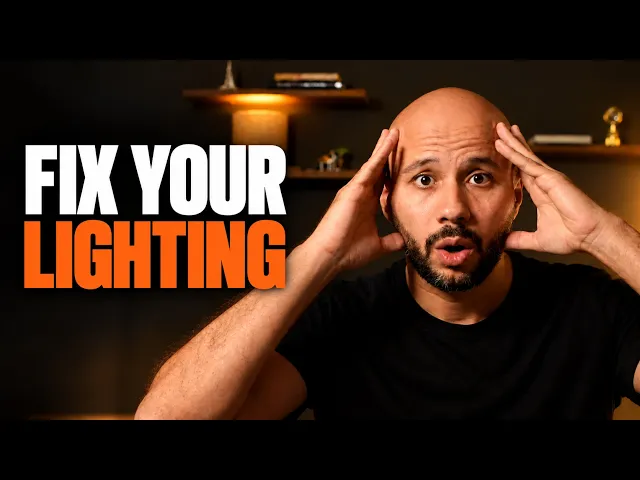
Watch the Before-and-After Lighting Demonstration
See how changes in lighting position, intensity, and background illumination can transform the appearance of an SME recording.
[Embed the full lighting demonstration video here.]
Why Lighting Distribution Matters More Than Brightness
One of the most common mistakes in presenter recordings is relying on a single overhead light.
Ceiling lighting often produces shadows around the eyes, under the nose, and beneath the chin. Depending on the room, it can also create uneven illumination and leave the presenter's face darker than the surroundings.
Adding more brightness does not necessarily solve these problems.
Professional lighting is about controlling three visual qualities:
Dimension: Creating gentle highlights and shadows that give the face natural shape.
Separation: Making the presenter visually distinct from the background.
Attention: Directing the viewer's focus toward the person delivering the lesson.
These qualities are especially important in talking-head training videos, where learners may spend extended periods looking at the same presenter.
A four-light arrangement provides a structured way to control each one.
1. Key Light: The Foundation of Your Recording
The key light is the primary source illuminating the presenter.
It establishes the overall brightness of the face and creates the main direction of the lighting.
Recommended positioning
Place the key light approximately 30–45 degrees to one side of the presenter and slightly above eye level.
Angle it downward toward the face.
This positioning creates natural facial definition without relying on harsh frontal lighting.
For a softer result, use a diffused light source. The apparent size of the light relative to the presenter influences shadow softness: larger, closer sources generally produce softer transitions.
What to look for
A properly positioned key light should:
Illuminate the eyes and facial features clearly.
Create gentle shadows on the opposite side of the face.
Preserve natural skin texture without excessive glare.
Establish a clear direction for the scene's lighting.
Avoid placing the key so high that the eyes become heavily shadowed or so far to the side that half the face becomes unnecessarily dark.
Practical tip: Start with the key light only. Adjust its position and exposure until the presenter looks natural before introducing any additional lights.
2. Fill Light: Control the Shadows
Once the key light is positioned, the fill light is used to control the shadows it creates.
Its purpose is not to compete with the key. Instead, it softens the contrast between the illuminated and shadowed sides of the face.
Recommended positioning
Place the fill on the opposite side of the camera from the key light.
A position around 20–45 degrees from the camera axis is a useful starting point, although the ideal angle depends on the face and the intended look.
Keep the fill softer and less intense than the key.
As a starting point, aim for the fill to contribute roughly one to two stops less illumination than the key on the relevant side of the face, then adjust visually.
What to look for
A correctly balanced fill light should:
Reveal detail in facial shadows.
Reduce excessive contrast.
Keep the eyes clearly visible.
Preserve some natural facial dimension.
If both sides of the face appear equally bright and flat, the fill may be too strong.
If the shadowed side is nearly black, additional fill may be needed.
Practical tip: Turn the fill light off and on while monitoring the presenter. You should notice softer shadows—not a complete disappearance of facial shape.
3. Back Light: Separate the Presenter from the Background
The back light, sometimes called a rim light or hair light, serves a different purpose from the key and fill.
Instead of primarily illuminating the front of the face, it creates a controlled highlight around the presenter from behind.
This is particularly useful when the presenter is wearing dark clothing or recording against a dark background.
Recommended positioning
Place the back light behind and to one side of the presenter, outside the camera frame.
Position it slightly above the head and direct it toward the back of the head, shoulder, or upper body.
Its exact placement depends on the framing, hairstyle, clothing, and desired amount of separation.
What to look for
An effective back light can create:
A subtle highlight around the shoulder or side of the head.
Greater visual separation between presenter and background.
A more dimensional, cinematic appearance.
Avoid creating an excessively bright outline. The back light should support the portrait rather than become its most noticeable feature.
Also ensure the light isn't shining directly into the camera lens, which can reduce contrast or introduce flare.
Practical tip: The best rim light is often subtle. Toggle it off and on to evaluate whether it adds meaningful separation.
4. Practical Lighting: Add Depth to the Background
Practical lights are visible light sources that form part of the recording environment.
These might be table lamps, shelf lights, wall fixtures, or other decorative sources placed within the scene.
Unlike the back light, which illuminates the presenter from behind, practical lights primarily contribute to the atmosphere and appearance of the background.
Recommended positioning
Place practical lights behind the presenter, ideally at some distance from the face and in a position that creates a pleasing background composition.
Use them to illuminate selected areas rather than making the entire background uniformly bright.
Warm practical lights can create an appealing contrast with a more neutral key and fill.
For example:
Key and fill lighting can start around 5,000–5,600 K.
Warm practical lighting can start around 2,700–3,200 K.
These are creative starting points, not mandatory values. The right combination depends on the intended style and how the camera reproduces the sources.
What to look for
Effective practical lighting should:
Create subtle areas of interest behind the presenter.
Add a sense of depth to the environment.
Complement the main subject lighting.
Avoid distracting the viewer with excessive brightness.
If a background lamp becomes the brightest element in the image, it may draw attention away from the speaker.
Practical tip: Adjust practical lighting while looking through the camera, not just at the room with your eyes. The recorded result matters more than how bright the studio feels.
How to Position All Four Lights Together
A simple arrangement begins with the camera directly in front of the presenter.
From the camera's perspective:
Key: Front-left, approximately 45 degrees from the presenter, slightly elevated.
Fill: Front-right, softer and less intense than the key.
Back: Behind the presenter, angled toward the shoulder or side of the head.
Practical: Within the background, creating controlled ambient highlights.
The positions can be mirrored if the opposite side of the face is more suitable for the key.
[Insert the four-light setup diagram here.]
The exact angles are starting points. Small adjustments based on facial structure, glasses, background materials, and available space often produce better results than rigidly following a diagram.
How to Balance the Lights Step by Step
Rather than switching everything on at once, build the lighting in stages.
Step 1 — Establish the key
Turn on only the key light.
Adjust its position, diffusion, and intensity until the face is properly illuminated.
Evaluate the catchlights in the eyes and ensure there are no distracting shadows.
Step 2 — Introduce the fill
Turn on the fill light at a lower intensity.
Increase it gradually until the darker side of the face retains enough detail for a comfortable viewing experience.
Preserve some directional contrast.
Step 3 — Add the back light
Introduce a controlled rim highlight behind the presenter.
Check the shoulders and outline of the head.
Reduce the intensity if the separation looks artificial or overly bright.
Step 4 — Illuminate the background
Switch on the practical lights.
Adjust their brightness and color until they add depth without competing with the face.
Step 5 — Check the complete image
Review the composition through the recording camera.
Check facial exposure, highlight detail, shadow balance, color, and separation from the background.
Lock exposure and white balance where practical so the image remains consistent between takes.
Record a short sample and inspect it on a larger display before beginning the full session.
Color Temperature: Creating a Consistent Look
One challenge in multi-light recording environments is mixing different color temperatures.
For example, a cool-looking key combined with a warm fill may create uneven facial skin tones.
A more controlled approach is to keep the main presenter lighting consistent while allowing background practical lighting to introduce a deliberate color contrast.
Start by matching the key and fill as closely as possible, then set the camera's white balance deliberately rather than leaving it to change automatically between shots.
The back light can match the primary lights or provide a subtle creative accent, depending on the visual direction.
Consistency matters especially when recording multiple course modules. A stable lighting arrangement helps avoid noticeable differences from one lesson to another.
Five Common Lighting Mistakes to Avoid
1. Relying on overhead lighting
Overhead light can create deep facial shadows and distracting brightness patterns.
2. Making the fill brighter than the key
Excessive fill can eliminate dimension and make the face appear flat.
3. Using an overpowering back light
A bright halo around the presenter can look artificial and distract from the lesson.
4. Overlighting the background
Bright practical lights can draw attention away from the instructor.
5. Allowing exposure and white balance to change between takes
Automatic camera adjustments can create inconsistent skin tones and brightness across a course.
Lighting Consistency Is Part of a Scalable eLearning Production System
A strong lighting setup should not be recreated from scratch every time an SME records a new lesson.
Once you've established an effective arrangement, document the positions of the lights, their intensity settings, color temperatures, camera exposure, and recording distance.
This makes it easier to reproduce the same visual style across additional sessions, modules, and presenters.
For organizations producing educational video libraries, that consistency matters as much as the appearance of an individual recording.
The objective isn't simply to make one video look professional. It's to establish a recording environment that produces repeatable, professional results.
Download the SME Recording Lighting Guide
Want a visual reference for your next recording session?
Download The Big Catalyst's SME Recording Lighting Guide for the complete lighting placement diagram, setup workflow, and practical troubleshooting reference.
Key light. Fill light. Back light. Practical light. Four distinct roles working together.
Turn Your SME Recordings into Professional Learning Experiences
At The Big Catalyst, we help eLearning, EdTech, and training organizations transform SME recordings, instructional presentations, and workshops into polished course videos and consistent educational video libraries.
Already have recorded lessons or an upcoming training program?
Book a free strategy call to discuss how to structure, produce, and scale your educational video content.
Better Lighting for SME Recording: A Complete Four-Light Setup Guide
How to use key, fill, back, and practical lighting to create professional training videos.
Your subject matter expert might know their topic inside out. Their presentation could be well-structured, accurate, and genuinely valuable.
But if the recording has harsh shadows, uneven facial lighting, or a distracting background, the viewing experience can suffer before the lesson has even begun.
The solution isn't simply making the room brighter.
It's controlling where the light comes from, how it falls on the presenter, and how it separates them from the background.
In this guide, we'll break down four essential lighting roles; key, fill, back, and practical; and explain how they work together to create a clean, professional recording environment for educational videos.
Watch the Before-and-After Lighting Demonstration
See how changes in lighting position, intensity, and background illumination can transform the appearance of an SME recording.
[Embed the full lighting demonstration video here.]
Why Lighting Distribution Matters More Than Brightness
One of the most common mistakes in presenter recordings is relying on a single overhead light.
Ceiling lighting often produces shadows around the eyes, under the nose, and beneath the chin. Depending on the room, it can also create uneven illumination and leave the presenter's face darker than the surroundings.
Adding more brightness does not necessarily solve these problems.
Professional lighting is about controlling three visual qualities:
Dimension: Creating gentle highlights and shadows that give the face natural shape.
Separation: Making the presenter visually distinct from the background.
Attention: Directing the viewer's focus toward the person delivering the lesson.
These qualities are especially important in talking-head training videos, where learners may spend extended periods looking at the same presenter.
A four-light arrangement provides a structured way to control each one.
1. Key Light: The Foundation of Your Recording
The key light is the primary source illuminating the presenter.
It establishes the overall brightness of the face and creates the main direction of the lighting.
Recommended positioning
Place the key light approximately 30–45 degrees to one side of the presenter and slightly above eye level.
Angle it downward toward the face.
This positioning creates natural facial definition without relying on harsh frontal lighting.
For a softer result, use a diffused light source. The apparent size of the light relative to the presenter influences shadow softness: larger, closer sources generally produce softer transitions.
What to look for
A properly positioned key light should:
Illuminate the eyes and facial features clearly.
Create gentle shadows on the opposite side of the face.
Preserve natural skin texture without excessive glare.
Establish a clear direction for the scene's lighting.
Avoid placing the key so high that the eyes become heavily shadowed or so far to the side that half the face becomes unnecessarily dark.
Practical tip: Start with the key light only. Adjust its position and exposure until the presenter looks natural before introducing any additional lights.
2. Fill Light: Control the Shadows
Once the key light is positioned, the fill light is used to control the shadows it creates.
Its purpose is not to compete with the key. Instead, it softens the contrast between the illuminated and shadowed sides of the face.
Recommended positioning
Place the fill on the opposite side of the camera from the key light.
A position around 20–45 degrees from the camera axis is a useful starting point, although the ideal angle depends on the face and the intended look.
Keep the fill softer and less intense than the key.
As a starting point, aim for the fill to contribute roughly one to two stops less illumination than the key on the relevant side of the face, then adjust visually.
What to look for
A correctly balanced fill light should:
Reveal detail in facial shadows.
Reduce excessive contrast.
Keep the eyes clearly visible.
Preserve some natural facial dimension.
If both sides of the face appear equally bright and flat, the fill may be too strong.
If the shadowed side is nearly black, additional fill may be needed.
Practical tip: Turn the fill light off and on while monitoring the presenter. You should notice softer shadows—not a complete disappearance of facial shape.
3. Back Light: Separate the Presenter from the Background
The back light, sometimes called a rim light or hair light, serves a different purpose from the key and fill.
Instead of primarily illuminating the front of the face, it creates a controlled highlight around the presenter from behind.
This is particularly useful when the presenter is wearing dark clothing or recording against a dark background.
Recommended positioning
Place the back light behind and to one side of the presenter, outside the camera frame.
Position it slightly above the head and direct it toward the back of the head, shoulder, or upper body.
Its exact placement depends on the framing, hairstyle, clothing, and desired amount of separation.
What to look for
An effective back light can create:
A subtle highlight around the shoulder or side of the head.
Greater visual separation between presenter and background.
A more dimensional, cinematic appearance.
Avoid creating an excessively bright outline. The back light should support the portrait rather than become its most noticeable feature.
Also ensure the light isn't shining directly into the camera lens, which can reduce contrast or introduce flare.
Practical tip: The best rim light is often subtle. Toggle it off and on to evaluate whether it adds meaningful separation.
4. Practical Lighting: Add Depth to the Background
Practical lights are visible light sources that form part of the recording environment.
These might be table lamps, shelf lights, wall fixtures, or other decorative sources placed within the scene.
Unlike the back light, which illuminates the presenter from behind, practical lights primarily contribute to the atmosphere and appearance of the background.
Recommended positioning
Place practical lights behind the presenter, ideally at some distance from the face and in a position that creates a pleasing background composition.
Use them to illuminate selected areas rather than making the entire background uniformly bright.
Warm practical lights can create an appealing contrast with a more neutral key and fill.
For example:
Key and fill lighting can start around 5,000–5,600 K.
Warm practical lighting can start around 2,700–3,200 K.
These are creative starting points, not mandatory values. The right combination depends on the intended style and how the camera reproduces the sources.
What to look for
Effective practical lighting should:
Create subtle areas of interest behind the presenter.
Add a sense of depth to the environment.
Complement the main subject lighting.
Avoid distracting the viewer with excessive brightness.
If a background lamp becomes the brightest element in the image, it may draw attention away from the speaker.
Practical tip: Adjust practical lighting while looking through the camera, not just at the room with your eyes. The recorded result matters more than how bright the studio feels.
How to Position All Four Lights Together
A simple arrangement begins with the camera directly in front of the presenter.
From the camera's perspective:
Key: Front-left, approximately 45 degrees from the presenter, slightly elevated.
Fill: Front-right, softer and less intense than the key.
Back: Behind the presenter, angled toward the shoulder or side of the head.
Practical: Within the background, creating controlled ambient highlights.
The positions can be mirrored if the opposite side of the face is more suitable for the key.
[Insert the four-light setup diagram here.]
The exact angles are starting points. Small adjustments based on facial structure, glasses, background materials, and available space often produce better results than rigidly following a diagram.
How to Balance the Lights Step by Step
Rather than switching everything on at once, build the lighting in stages.
Step 1 — Establish the key
Turn on only the key light.
Adjust its position, diffusion, and intensity until the face is properly illuminated.
Evaluate the catchlights in the eyes and ensure there are no distracting shadows.
Step 2 — Introduce the fill
Turn on the fill light at a lower intensity.
Increase it gradually until the darker side of the face retains enough detail for a comfortable viewing experience.
Preserve some directional contrast.
Step 3 — Add the back light
Introduce a controlled rim highlight behind the presenter.
Check the shoulders and outline of the head.
Reduce the intensity if the separation looks artificial or overly bright.
Step 4 — Illuminate the background
Switch on the practical lights.
Adjust their brightness and color until they add depth without competing with the face.
Step 5 — Check the complete image
Review the composition through the recording camera.
Check facial exposure, highlight detail, shadow balance, color, and separation from the background.
Lock exposure and white balance where practical so the image remains consistent between takes.
Record a short sample and inspect it on a larger display before beginning the full session.
Color Temperature: Creating a Consistent Look
One challenge in multi-light recording environments is mixing different color temperatures.
For example, a cool-looking key combined with a warm fill may create uneven facial skin tones.
A more controlled approach is to keep the main presenter lighting consistent while allowing background practical lighting to introduce a deliberate color contrast.
Start by matching the key and fill as closely as possible, then set the camera's white balance deliberately rather than leaving it to change automatically between shots.
The back light can match the primary lights or provide a subtle creative accent, depending on the visual direction.
Consistency matters especially when recording multiple course modules. A stable lighting arrangement helps avoid noticeable differences from one lesson to another.
Five Common Lighting Mistakes to Avoid
1. Relying on overhead lighting
Overhead light can create deep facial shadows and distracting brightness patterns.
2. Making the fill brighter than the key
Excessive fill can eliminate dimension and make the face appear flat.
3. Using an overpowering back light
A bright halo around the presenter can look artificial and distract from the lesson.
4. Overlighting the background
Bright practical lights can draw attention away from the instructor.
5. Allowing exposure and white balance to change between takes
Automatic camera adjustments can create inconsistent skin tones and brightness across a course.
Lighting Consistency Is Part of a Scalable eLearning Production System
A strong lighting setup should not be recreated from scratch every time an SME records a new lesson.
Once you've established an effective arrangement, document the positions of the lights, their intensity settings, color temperatures, camera exposure, and recording distance.
This makes it easier to reproduce the same visual style across additional sessions, modules, and presenters.
For organizations producing educational video libraries, that consistency matters as much as the appearance of an individual recording.
The objective isn't simply to make one video look professional. It's to establish a recording environment that produces repeatable, professional results.
Download the SME Recording Lighting Guide
Want a visual reference for your next recording session?
Download The Big Catalyst's SME Recording Lighting Guide for the complete lighting placement diagram, setup workflow, and practical troubleshooting reference.
Key light. Fill light. Back light. Practical light. Four distinct roles working together.
Turn Your SME Recordings into Professional Learning Experiences
At The Big Catalyst, we help eLearning, EdTech, and training organizations transform SME recordings, instructional presentations, and workshops into polished course videos and consistent educational video libraries.
Already have recorded lessons or an upcoming training program?
Book a free strategy call to discuss how to structure, produce, and scale your educational video content.
Latest Insights
Explore More Learning Insights
Practical ideas on educational video, visual storytelling, and scalable content systems for eLearning and EdTech teams.
How to Reduce SME Review Time Without Sacrificing Accuracy
The goal is not to involve SMEs less where accuracy matters. It is to use their limited time on the decisions that genuinely require their expertise.
How to Reduce SME Review Time Without Sacrificing Accuracy
The goal is not to involve SMEs less where accuracy matters. It is to use their limited time on the decisions that genuinely require their expertise.

How to Scale a Video Library Without Losing Consistency
Consistency at scale does not come from making every video identical. It comes from defining which decisions should remain stable and which should adapt to the learning objective.
How to Scale a Video Library Without Losing Consistency
Consistency at scale does not come from making every video identical. It comes from defining which decisions should remain stable and which should adapt to the learning objective.

The Hidden Cost of Rebriefing a New Video Freelancer for Every Project
The invoice for a video does not show the internal hours spent explaining the audience, content, visual standards, approval process, and earlier decisions all over again.
The Hidden Cost of Rebriefing a New Video Freelancer for Every Project
The invoice for a video does not show the internal hours spent explaining the audience, content, visual standards, approval process, and earlier decisions all over again.

Why Clear Course Previews Increase Learner Confidence
A strong course preview does not simply promote the curriculum. It lets prospective learners experience enough of the teaching to imagine themselves succeeding.
Why Clear Course Previews Increase Learner Confidence
A strong course preview does not simply promote the curriculum. It lets prospective learners experience enough of the teaching to imagine themselves succeeding.
Turn complex training content into a clear, consistent video library, without repeatedly briefing new production vendors.
Need a Reliable Video Partner for Your Learning Content?
Need a Reliable Video Partner
for Your Learning Content?
Turn complex training content into a clear, consistent video library, without repeatedly briefing new production vendors.
Need a Reliable Video Partner for Your Learning Content?
Turn complex training content into a clear, consistent video library, without repeatedly briefing new production vendors.